Layouts
A layout decides what a marking looks like: the coloured bar at the top, a frame, a banner. The colour itself comes from the rule.
Several rules can share one layout, so you set it up once. Every new rule gets the layout called Default, which colours the bar at the top and draws a frame around the window. That is enough for most people; change it only if you want more.
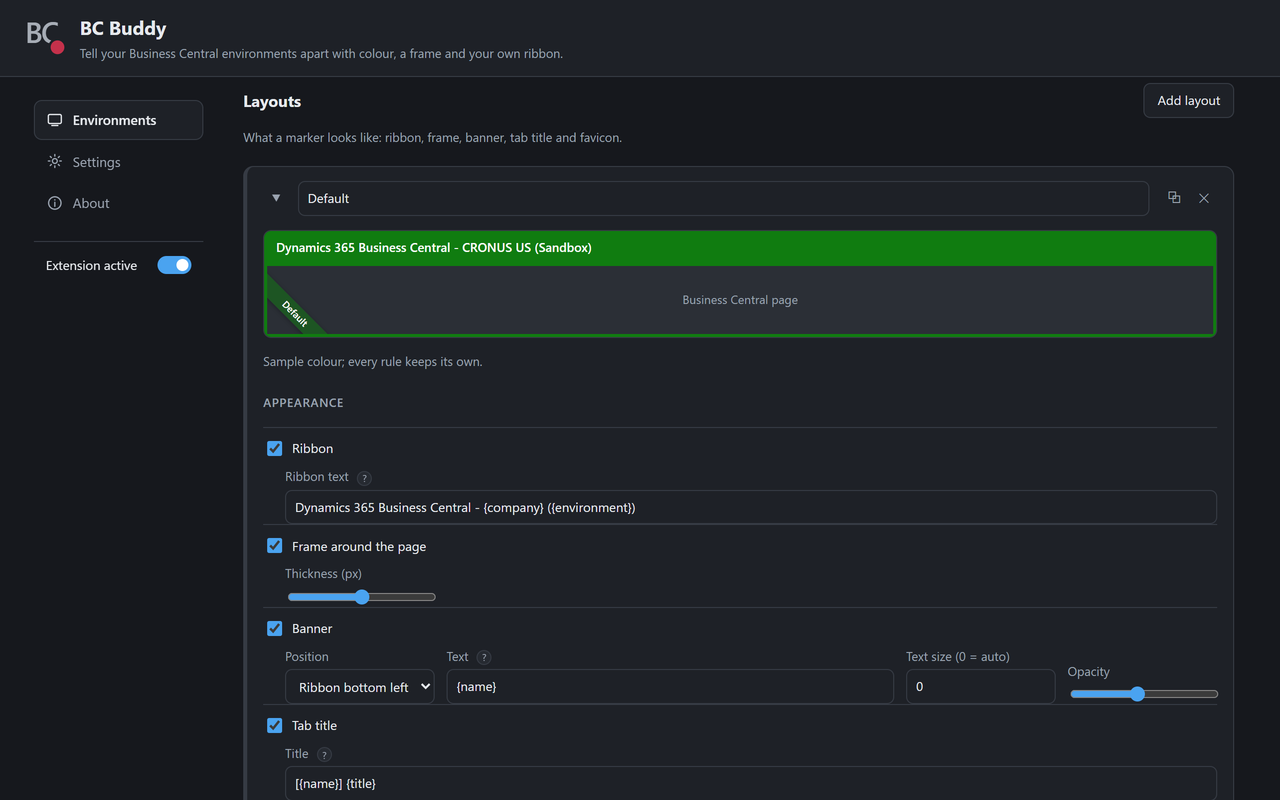
What a layout can show
Tick the ones you want:
- Ribbon
- The bar at the top of Business Central, in the colour of the rule, with a text of your own.
- Frame
- A coloured border around the whole window, 1 to 5 pixels wide.
- Banner
- A bar along the bottom, or a diagonal ribbon in one of the corners, with a
text such as
SANDBOX. At Size all the way left, the text shrinks to fit; further right it is larger. - Tab title
- The name of the browser tab with a marking added, for example
[TEST] Company Information. - Favicon
- A coloured icon on the browser tab with one or two letters, so you spot the right tab in a row of tabs. You type the letters on the rule.
The text colour is Automatic: white or black, whichever is easiest to read on the colour of the rule.
Your own text
In the ribbon, banner and tab title you can type plain text, and add these placeholders, which BC Buddy fills in for you:
| Type | Becomes |
|---|---|
{name} |
The name of the rule, such as PRODUCTION |
{environment} or {env} |
The environment, such as Sandbox |
{company} |
The company, such as CRONUS BE |
{title} |
The original name of the browser tab |
Example
A ribbon text of {name} - {company} shows PRODUCTION - CRONUS BE. On a
page without a company it simply shows PRODUCTION: a placeholder that
stays empty takes the dash next to it along.